Hirental
A clear-span event marquee on an English lawn, with evening light along the glass sides.

Software for marquee & event hire

Marquee hire software
for the whole team.

Track enquiries, produce itemised quotes and show customers their marquee in 2D and 3D. Check stock for the hire dates, then give the warehouse a load list and the site crew detailed installation plans.

Hirental features

Enquiry tracking

Keep every enquiry in view.

Record the customer’s brief, venue, event dates and next follow-up in one place. Whoever takes the next call can see what was agreed and when to get back in touch.

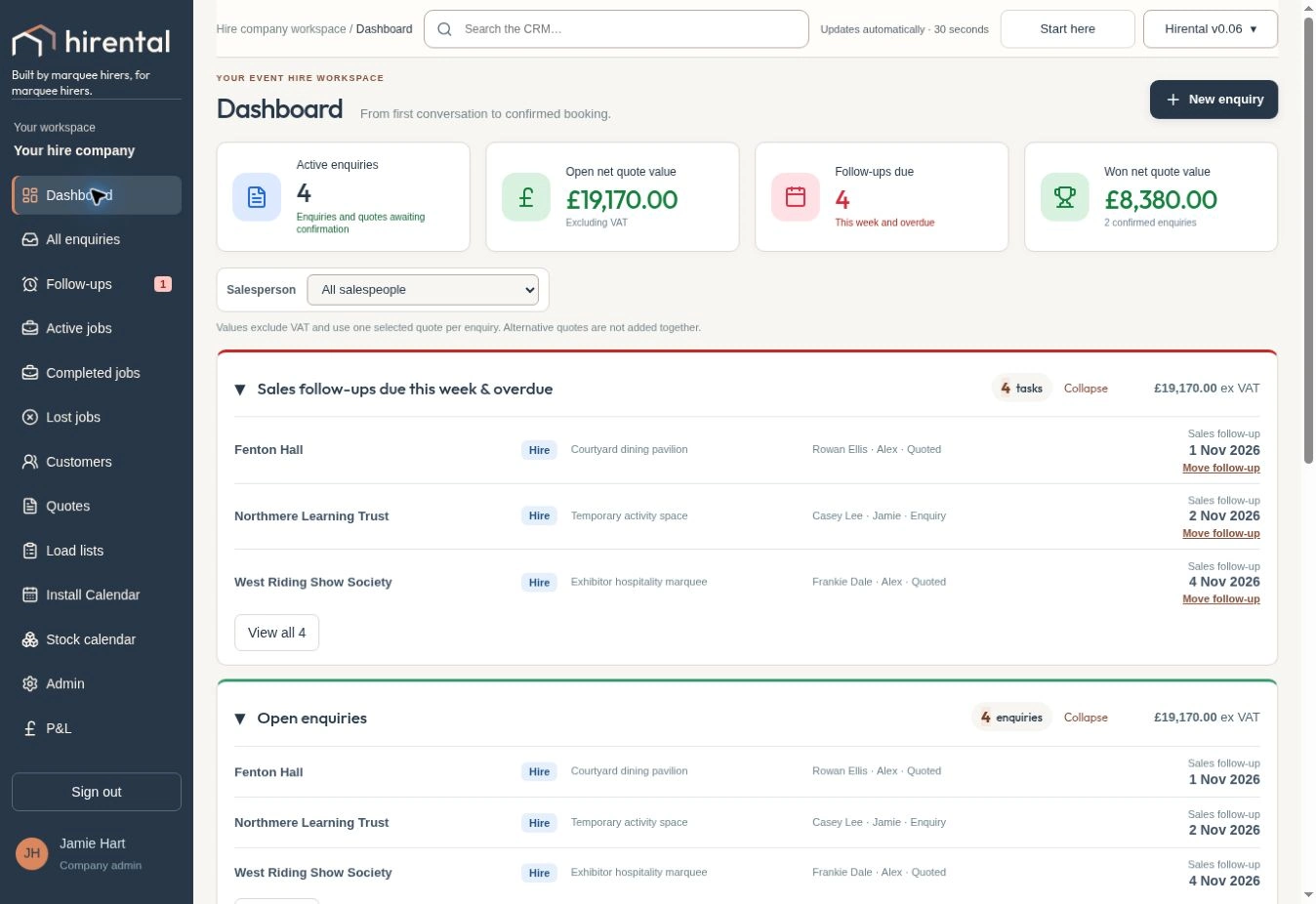
See the customer record or switch to the dashboard to review follow-ups due.

Enquiries & follow-upsIllustrative CRM data
Customer, contact and event dates
Customer quotations

Price the marquee as a package.

Choose the frame, walls, entrances, flooring and furniture in the marquee package builder. Produce a branded, itemised quote that shows the customer exactly what’s included, the VAT and the deposit due.

Open sample quote PDF ↗
Itemised customer quotationSample PDF
Open full PDF ↗
2D & 3D planning

Show the marquee behind the quote.

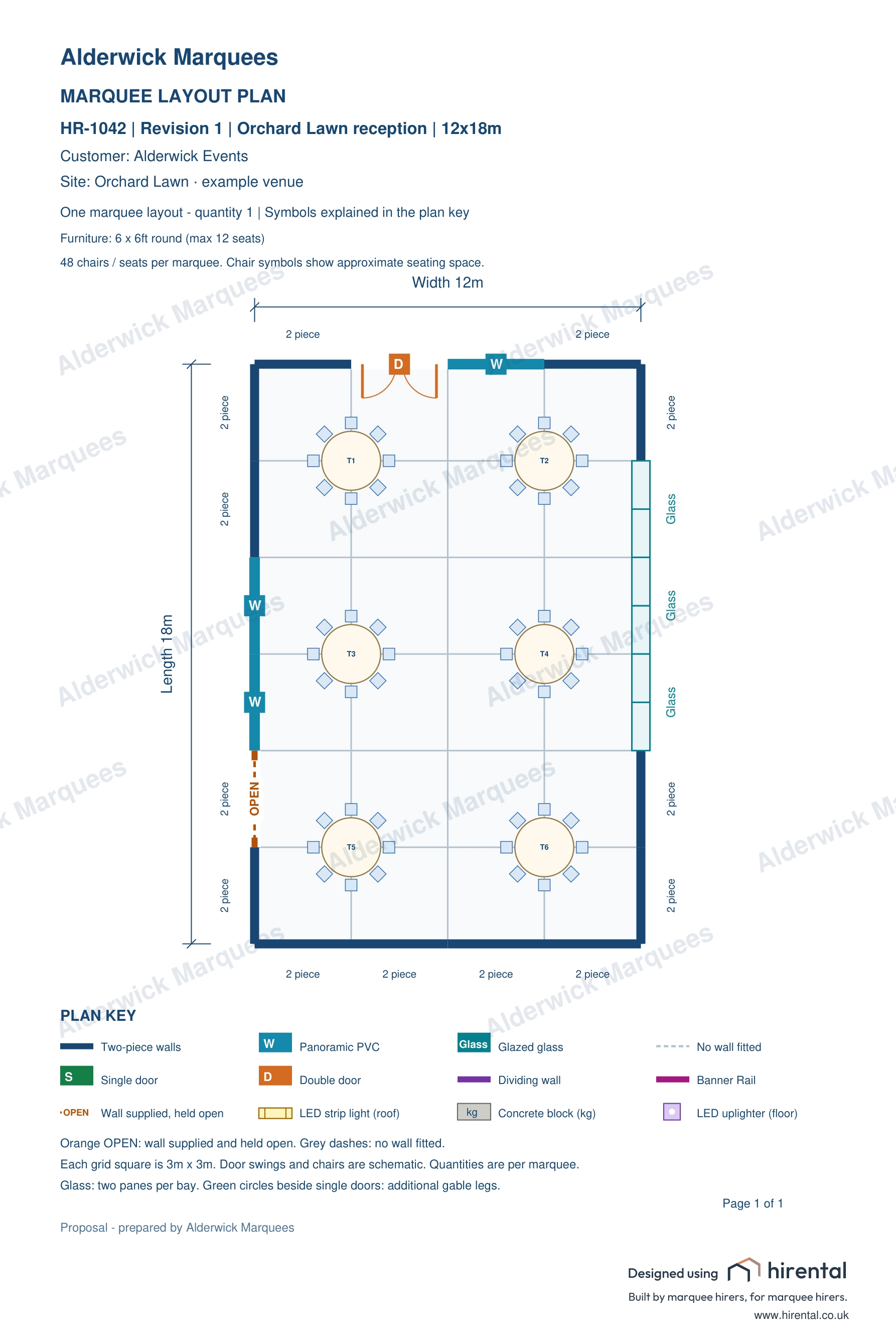
Place doors, dividing walls and seating on the 2D plan. Rotate the furnished marquee in 3D and toggle the PVC to show customers the layout inside.

Interactive marquee · 12 × 18 m

Drag to rotate the marquee.

Stock availability

Check availability before you commit.

Compare the kit on enquiries and quotes with confirmed hires across the installation and takedown dates. See what’s available, spot a shortfall and decide whether to change the package or arrange sub-hire.

See the jobs behind every number.
Select a date tile to explore booked and quoted quantities, departures and returns.

HirentalStock calendarInteractive example

9–15 November 2026

Stock availability & movements

All availableSome outUnder 25% / short

Select a tile to see the quantities and jobs. Each bar shows how much of your company stock is free.

Warehouse load lists

Spot the shortage.
Then load the job.

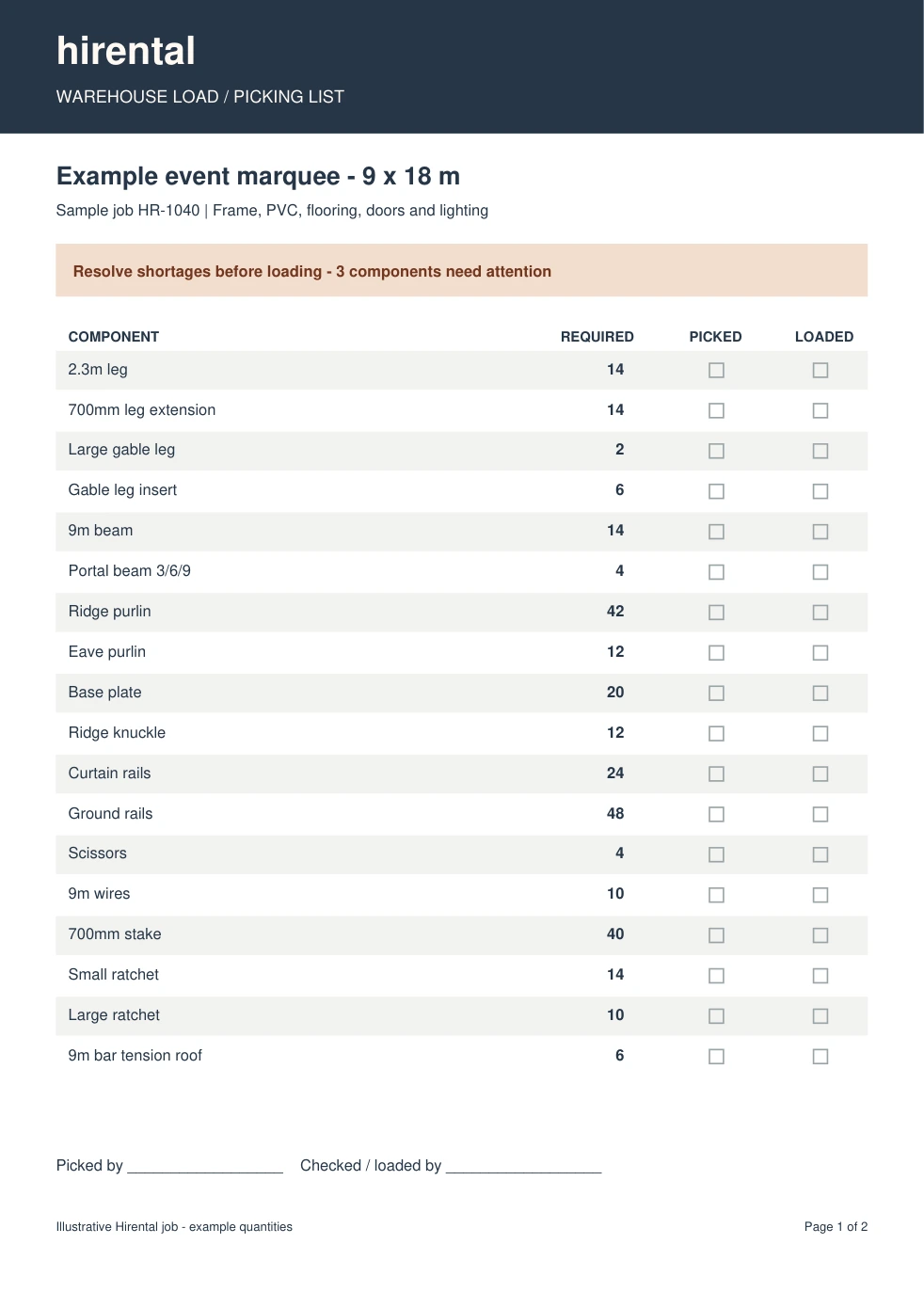
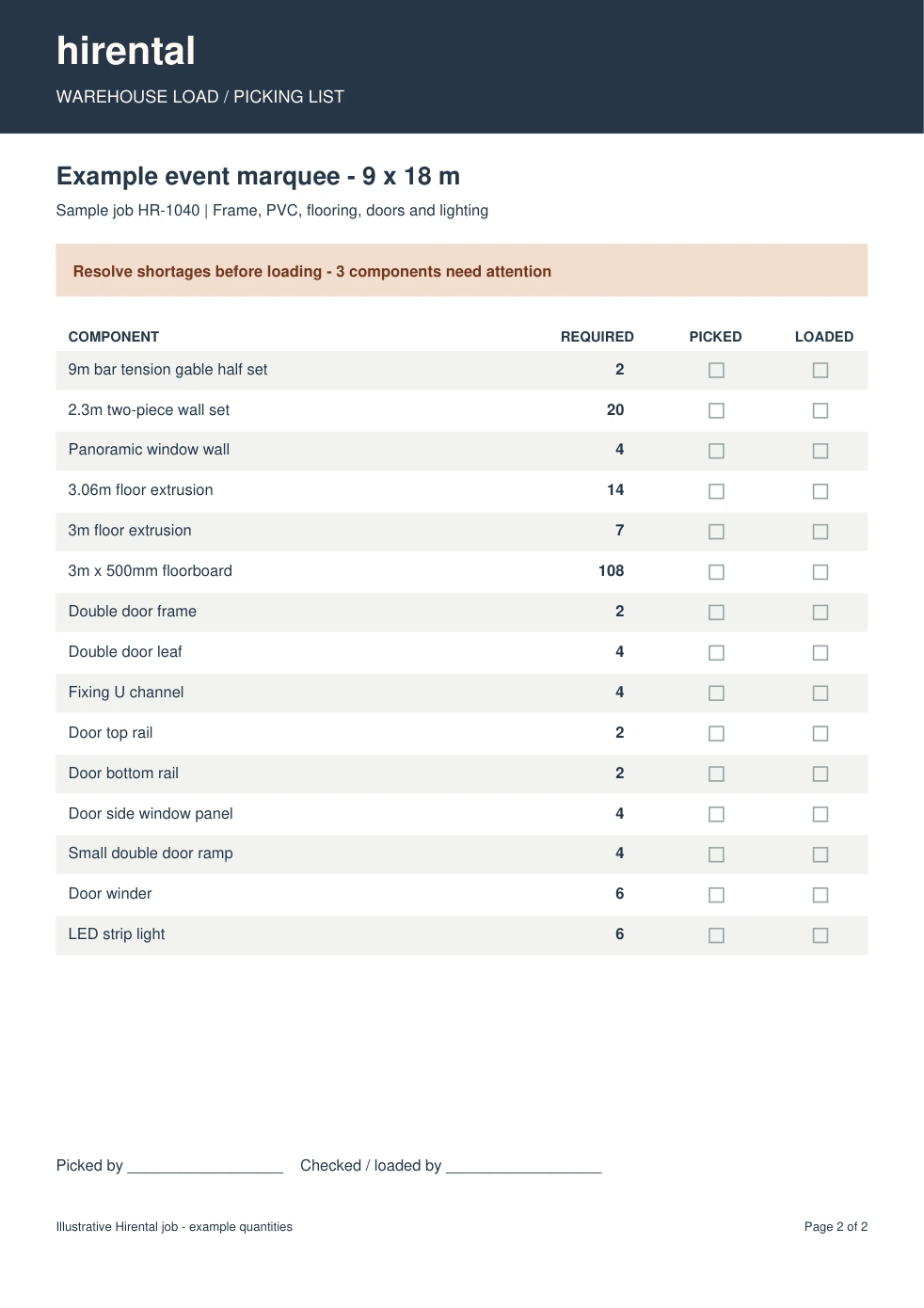
See what’s required, what’s available and what’s short before the warehouse starts picking. Turn the agreed quantities into a PDF load list for the team.

From stock check to picking list

Shortages at a glance.

The components that need attention stand out immediately, with required, available and short quantities side by side.

CRM / JOB LOAD LISTOpen PDF ↗
HR-1040 · Example jobWarehouse stock check9 × 18 m marquee · illustrative quantities
3 components shortResolve before sending to the warehouse
RequiredAvailableShort

See the shortfall before picking. Arrange sub-hire or adjust the package.

Shortages stand out before the warehouse starts picking.
Site installation plans

Give installers the detail for each bay.

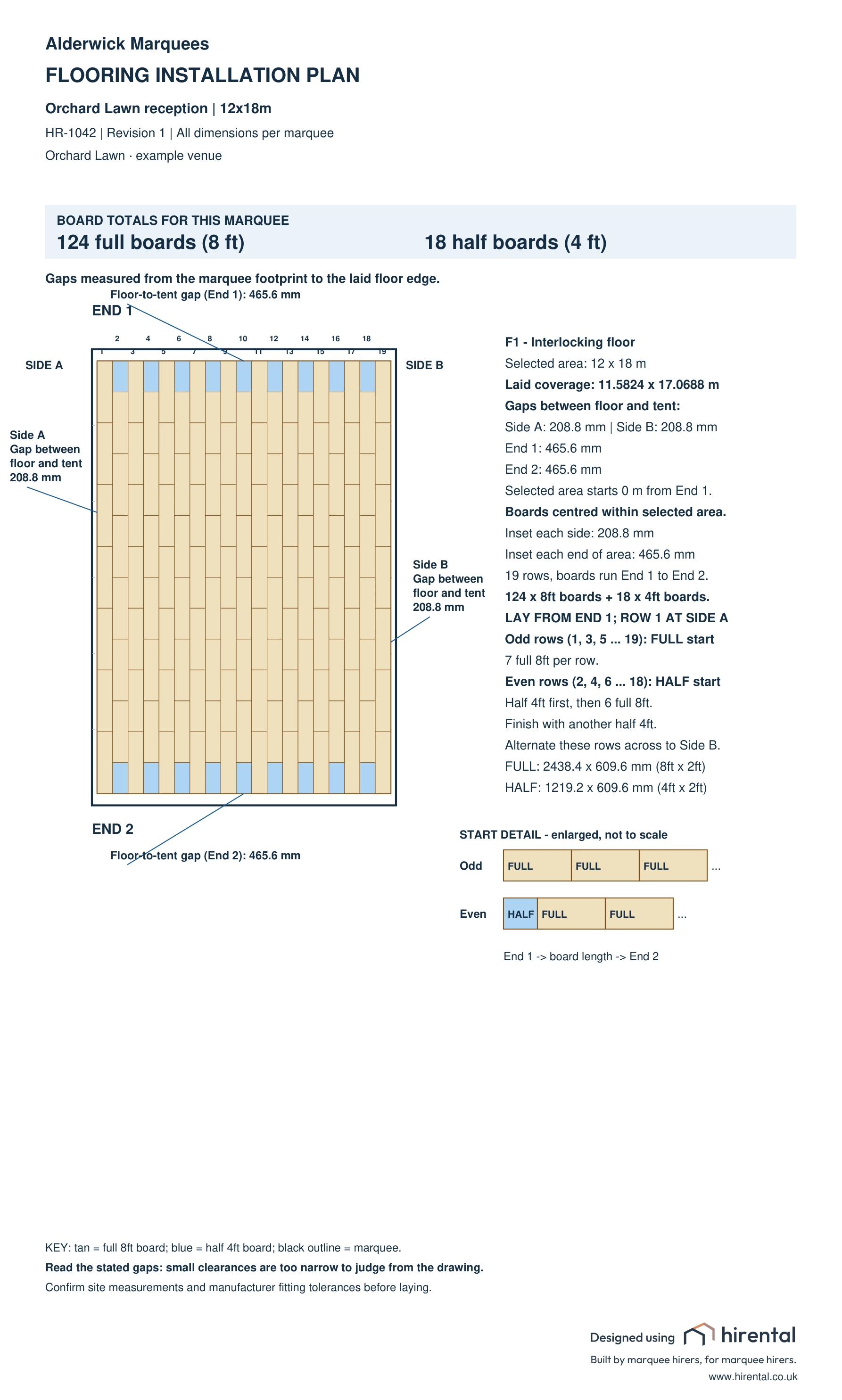
Print an installation sheet showing bay numbers, wall types, door positions and portal beams. The separate flooring plan shows the board layout, edge gaps and laying instructions the crew needs on site.

Installation plan
Open PDF ↗
Flooring plan
Open PDF ↗

Product overview

See Hirental in action.

Watch the full walkthrough, or choose a 45-second film about the part of the CRM you use.

Explore the CRMProduct tour · British narration · 3 min 7 sec
Watch full screen ↗

For a larger view on your phone, turn it sideways.

45-second feature films

Read the walkthrough transcript

Dashboard. The dashboard shows open enquiries, quoted value and calls due this week. I’ll open Ashdown Hall and log the customer’s request for a double entrance on the lawn side. Click Save note, then scroll down to activity history. There’s the message, with the time and who logged it. The next colleague who opens this enquiry can see exactly what was agreed.

Enquiries and quotations. Under Enquiries and jobs, I’ll open the quotation for Ashdown Hall. Edit package takes us into the marquee builder. This one is twelve metres wide by eighteen metres long. Next are the walls and doors. The plan shows where the double entrance goes. Click a bay to place a panoramic window. On the Flooring tab, this marquee has an interlocking timber floor. You can check the floor type and size here. The Review tab brings the package items and prices together. Once I’m happy, I apply the package to the quote. Open the customer’s PDF. Here’s the complete quotation, with the itemised hire, value added tax, deposit and balance all on one page.

2D and 3D planning. In the quote’s two-dimensional plan, I’ll drag across the grid to place a partition. Now open the same marquee in three dimensions. Here it is with the outer PVC fitted. Switch off the coverings and the aluminium frame stays standing. I’ll rotate the view. You can see the legs, roof beams and purlins above the timber floor and tables.

Stock availability. Include enquiries in the stock calendar and Wednesday shows one double door short. Click the red figure to see the bookings behind it. Now open the quote’s load list and scroll down to the red double door frame. This job needs one. We own two, but neither is available for these dates. The shortfall is one. We need to source another frame before confirming this hire.

Active jobs and P&L. Active jobs shows confirmed hires and their install and derig dates. I’ll open this job’s profit and loss, find the missing actual cost and enter the derig labour. Saving it updates the job margin, so I can see what the hire is earning.

Warehouse and installation. In the warehouse, the load list tells the crew what to pick. The red door frame is the item we still need to source. Open the picking list, mark a component as picked, and the office can see the progress. Here’s the full installation PDF. It shows the frame layout, entrance and side elevations. The flooring PDF shows the complete board pattern and the gaps at the edges, so the crew can set it out on site. Bring us a job and we’ll show you how it works in Hirental.

Explore more drawing examples

Planning studio

One marquee.
Every angle.

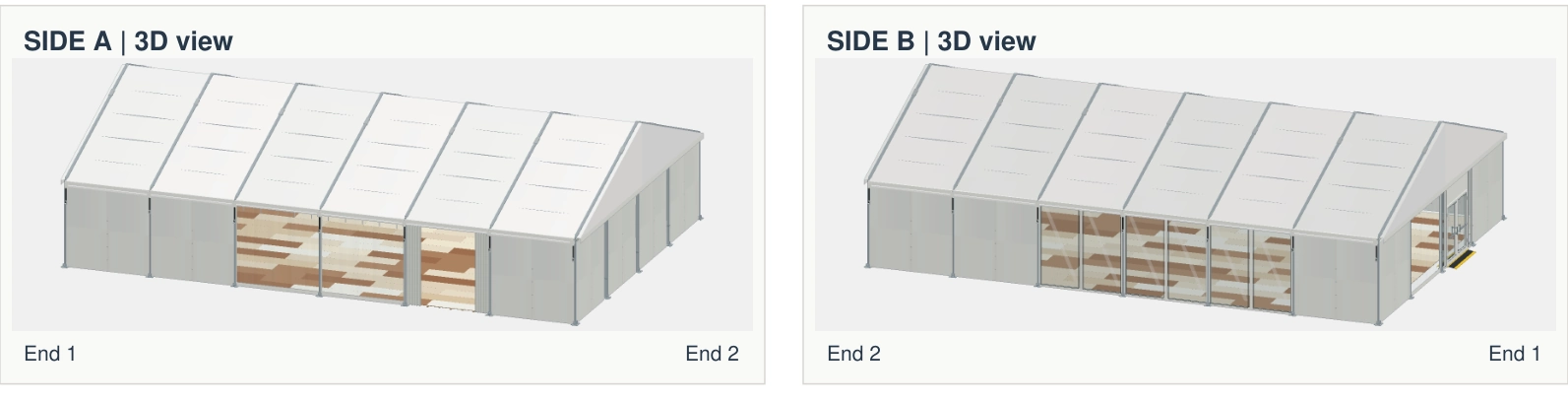
Help customers picture their event. Explore the marquee in 3D, check the layout in 2D and turn it into drawings the crew can take to site.

Example marquee12 × 18 m6 bays48 seats
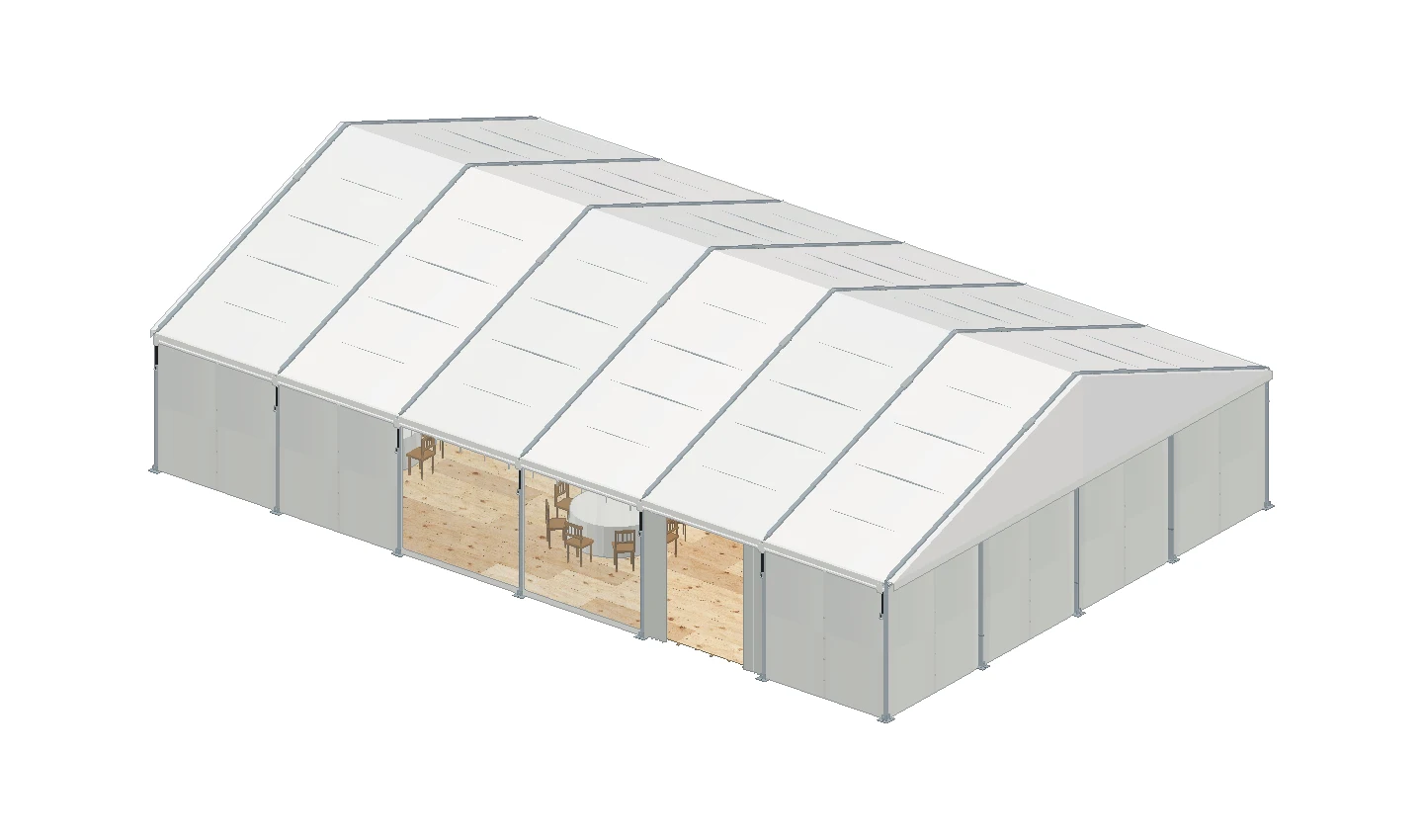
MODEL / EXTERIOR
Exterior of the reception marquee
Drag to rotate ↔000°
Customer presentationHR–1042 / R1

3D MARQUEE VISUALISATION

Show the customer their marquee.

Compare the closed exterior with a cutaway of the same job. Switch to the frame to see how the bays fit together.

The dashboard

See who needs a call today.

Open the dashboard to see which follow-ups are due, who owns each enquiry and how much quoted work is still open.

Hirental · your hire business
Hirental dashboard with open enquiries, quote values and a list of sales follow-ups from an example hire company.
One job. One clear picture.Office → warehouse → installation

Built by marquee hirers,
for marquee hirers.

Win the booking, plan the marquee and keep the whole team in the picture. Hirental connects your enquiries, quotations, 2D and 3D plans, stock, load lists and installation sheets, with a P&L for every job.

See what Hirental can do for your business ↗
01

Produce detailed quotations in minutes

Build an itemised customer quotation, with 3D visuals and 2D plans generated directly from the marquee package behind your quote.

02

Check shortages before you send the quote

Check stock availability instantly against the proposed hire dates. Spot shortages early, adjust the package or arrange sub-hire before you commit.

03

Impress customers with stunning 3D visuals

Bring the marquee to life with accurate, furnished 3D visuals. Show customers the layout, entrances and finishes so they can picture their event.

04

Keep track of costs on every job

A P&L is generated for every job. Compare forecast and actual costs, track installation and derig spend, and see what each hire earns.

05

Never lose sight of an enquiry

Set follow-ups, log conversations and track progress across your team. Whoever takes the next call can pick up with the full history in front of them.

Questions

Questions from hire companies.

Who is Hirental designed for?+

Marquee hire companies that want to connect enquiries, quoting, planning, stock and job management. It is built around the detail of clear-span marquee packages and the work involved in delivering them.

Can I check stock before a job is confirmed?+

Yes. Check availability at enquiry or quote stage against the proposed installation and takedown dates. See any shortfall early so you can review the package or arrange sub-hire before committing.

Can I use my own company branding?+

Yes. Set your company details and upload your logo for your documents. Your quotes carry your own company identity, contact details and references.

Does it handle jobs with more than one site?+

Yes. You can build quotes across multiple sites, produce site-specific load lists and review profitability by job or site.

Can the office and site team use it?+

Hirental has office roles and permissions, warehouse access and layouts designed to work across desktop and mobile. We can walk through the screens relevant to each part of your team in a demo.

How do we get started, and what does it cost?+

Hirental costs £45 per user, per month for your company, plus VAT. Initial onboarding is £975 + VAT. Bespoke changes are priced on enquiry. See pricing and included features →

Let’s talk marquees

Bring us a job.
We’ll show you how it works in Hirental.

We’ll show you how it runs through Hirental, from the first quote and stock check to the plans you hand the crew. Tell us about the job, or email sales@hirental.co.uk.

Arrange your demo

Give us the size, dates or kit you have in mind.

This opens your email app with your enquiry ready to send. Your details are used to respond to your enquiry.

Scroll or drag to explore

0:00 / 3:07